Update - July 2026: Since this was published, Starlink has partially reversed course and re-enabled GPS over the local gRPC API for customers on Priority plans, though not, at the time of writing, on standard Residential plans. The five-source fallback below still applies: on Priority the dish GPS simply becomes an available source again, and Nexus Telemetry uses it automatically.
Starlink is removing GPS location from the local API on 20 May 2026, forcing us to accelerate our GPS support.
In our last post we covered what SpaceX is removing and why it matters. This post is about what we built.
We’ve been working on external GPS receiver support for Nexus Telemetry since February 2026. Version 1.0 shipped with GPS recorded directly from the dish via gRPC. The plan was always to extend that with external GPS sources, because different users have different location needs.
For someone with a dish on their roof, location doesn’t matter much. Set it once and forget it. For mobile users running a Starlink Mini in an RV or on a boat, the built-in dish GPS is convenient and accurate enough. But for more specialised deployments there are users who need navigation-grade positioning, field research equipment that relies on existing GNSS infrastructure, or installations where GPS needs to be independent from the Starlink hardware for resilience or accuracy. These users may already have GPS equipment they rely on and want to keep that separate from what’s built into the dish. That’s what we were building for.
SpaceX caught us mid-build. The 15 April 2026 email set a 20 May 2026 deadline, but what really forced our hand was that the opt-in toggle in the Starlink app started disappearing immediately. On newer hardware the toggle is already gone. The email says May. The app says now. So we accelerated the work and shipped the GPS changes in the latest release of Nexus Telemetry ahead of our original schedule.
What’s changing
The Starlink dish has a GPS receiver. It knows where it is. Until 20 May 2026, it shares that position via an opt-in gRPC endpoint on your local network. From 20 May 2026, it stops.
For a fixed dish on a roof, this is a minor inconvenience. Set your coordinates once and move on. For a Starlink Mini on a boat, an RV on the road, or a research deployment that moves between sites, it matters more. The location updated automatically as the dish moved. That capability is about to disappear.
The official alternative is the enterprise Telemetry API, which returns an H3 cell index rather than actual coordinates. Depending on the resolution, that could be kilometres off your actual position. And enterprise plans aren’t priced for individual users.
What we built
Nexus Telemetry now supports five location sources, with automatic fallback between them. The goal is that the app always knows where the dish is, covering the right use case for each user.
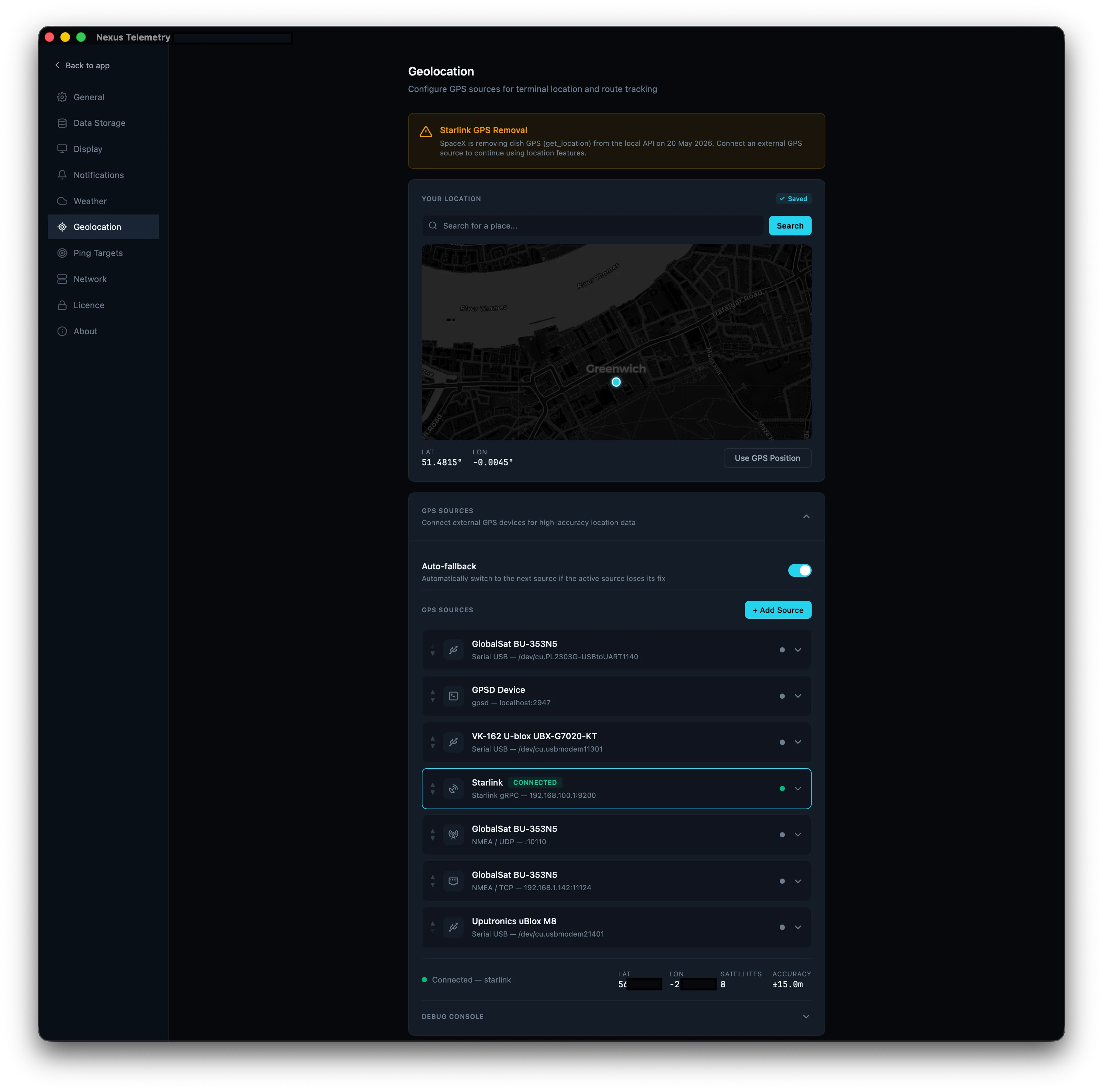
Manual location picker
For fixed installations. Search for an address or postcode via OpenStreetMap’s Nominatim service, click a point on the map, or type coordinates directly. The location is saved locally and used for weather lookups, satellite tracking, and session reports. For most Home users with a fixed location, this is all they need, and it’s arguably simpler than the old method of navigating through four screens in the Starlink app to find a debug toggle.
Serial GPS (USB dongles)
This is the core mobile solution. Plug in a USB GPS receiver, select the serial port, and Nexus Telemetry reads standard NMEA 0183 sentences directly from the device. No intermediary software, no gpsd dependency, no network broadcasting.
We parse NMEA at the sentence level. $GNRMC for position, speed, and course. $GNGGA for fix quality, altitude, and satellite count. Checksum validation on every sentence. Support for both $GP (GPS-only) and $GN (multi-constellation) prefixes. Baud rate is configurable from 4800 to 921600.
The decision to parse raw NMEA rather than relying on gpsd was deliberate. Prof. Jianping Pan’s research group at the University of Victoria flagged a gpsd bug affecting position accuracy in certain configurations. Going lower-level gives us control over the parsing pipeline and removes a dependency that not every user will have installed.
NMEA over TCP and UDP
For setups where the GPS receiver isn’t directly connected to the machine running Nexus Telemetry. A common pattern is a Raspberry Pi with a USB dongle forwarding NMEA sentences over the network via socat. Nexus Telemetry connects as a TCP client or listens for UDP broadcasts on a configurable port.
This is particularly relevant for marine installations where the GPS antenna is mounted externally and the monitoring machine is below deck. Run a Pi near the antenna, forward NMEA over the ship’s network, and Nexus Telemetry picks it up from anywhere on the LAN.
gpsd
For users who already have gpsd running. This is common on Linux systems and marine setups that aggregate multiple GNSS sources. Nexus Telemetry connects to the gpsd JSON protocol, subscribes to position updates, and extracts coordinates and quality data. Supports multiple concurrent gpsd sessions if needed.
Starlink gRPC
The original source. Still works on dishes where it hasn’t already been disabled. Nexus Telemetry continues to poll it where available and will gracefully fall back to other sources if SpaceX removes it. We genuinely hope they keep it available in some form, even if gated behind authentication, because it is convenient and it works well. But we’re no longer dependent on it.
The auto-fallback chain
With multiple GPS sources available, the obvious question is: what happens when one stops working? Rather than leaving the user to notice and manually switch, Nexus Telemetry handles it automatically. If your active source disappears, the app falls back to the next best option without interruption. No manual intervention, no missed location data.
You control the priority order by ordering sources in the UI. Nexus Telemetry works through the list from top to bottom and uses the first source that’s available. If that source drops out (the dongle is unplugged, the dish GPS is disabled, gpsd stops) it falls to the next available source in the list.
The user sees a location source indicator in the dashboard showing which source is currently active and how many satellites it’s tracking. If the Starlink GPS is removed on 20 May 2026, users with a dongle plugged in won’t notice anything change. Users without one will see the source switch to manual with a banner explaining what happened and what to do about it.
The in-app warning
We added a banner to the dashboard that appears on any dish still using the Starlink gRPC location source. It explains the 20 May 2026 deadline, what’s changing, and links to instructions for setting up an alternative source. We’d rather our users are prepared before the cutoff than surprised by it.
A note on location and network access
We don’t know why SpaceX is removing the GPS endpoint. It may be for privacy or security reasons, and if so, that’s understandable. But if you’re moving to an alternative, it’s worth thinking about what the security picture looks like now compared to what it was before.
The opt-in gRPC endpoint actually had more protection than most people realise. On iOS, accessing a local network address requires an explicit OS-level permission prompt before any app can reach devices on the LAN. On Android, an app needs at least internet permission. The endpoint was disabled by default and required the user to deliberately enable it through the Starlink app. So you had an opt-in gate at the application level, plus OS-level network permission on mobile devices.
To be clear, these OS-level permissions only apply to apps. A user with command-line access on the same network could reach the gRPC endpoint directly with nothing more than the Starlink toggle enabled. But that’s still one gate more than UDP, TCP, or gpsd, which require none.
The alternatives each have a different security profile. Here’s how they compare:
| Source | Network devices can read | Local apps can read | Opt-in required |
|---|---|---|---|
| Starlink gRPC (being removed) | Yes | Yes | Yes (toggle in app) |
| Serial dongle (local only) | No | Yes | Physical (plug in/out) |
| NMEA over UDP (network shared) | Yes (broadcast to all) | Yes | No |
| NMEA over TCP (network shared) | Yes | Yes | No |
| gpsd (network shared) | Yes | Yes | No |
The standout here is the serial dongle connected directly to your machine without network sharing. It’s not visible to other devices on the network. The only things that can read it are processes running on the same computer. And the “opt-in” is physical: you plug it in when you need it and pull it out when you don’t. That’s arguably a clearer security boundary than a software toggle.
The picture changes when you need to share GPS with multiple devices. The moment you forward NMEA over UDP, TCP, or run gpsd, your position data is accessible to anything on the network with no authentication and no opt-in gate. That’s the same network exposure the gRPC endpoint had, but without the software toggle to turn it off. Your only option to stop broadcasting is to physically disconnect the receiver or stop the forwarding service.
This isn’t a reason to avoid these alternatives. They’re all standard, widely used, and trusted in marine and field deployments worldwide. But if you’re making the switch, it’s worth being aware of the trade-offs so you can choose the right approach for your setup.
If SpaceX’s concern is security, a welcome outcome would be to keep the endpoint but strengthen it. Perhaps tying access to a local authentication token, a device pairing step, or requiring the user to confirm access per device. That would address the concern while preserving the convenience that so many users and integrators rely on. We’d be happy to support whatever authentication mechanism they introduce in Nexus Telemetry.
The broader point is straightforward. The opt-in gRPC endpoint that SpaceX offered was not inherently insecure. It was disabled by default, required user action to enable, and on iOS was further gated by OS-level network permissions. In most configurations, the alternatives that users are now adopting offer the same or greater level of exposure. That’s not a reason to avoid them, but it’s worth understanding before you make the switch.
What’s next
The GPS work is shipped and working. We’ve now published our hardware comparison, where we tested four USB GPS receivers alongside the Starlink Mini’s built-in GPS across several hundred miles of driving. The results were mostly predictable, with one surprise.
If you’re running Nexus Telemetry, update to the latest release and configure your preferred GPS source before 20 May 2026. If you’re not running Nexus Telemetry yet, you can try it with a free trial at nexustelemetry.com.
Nexus Telemetry is built by Liquidbinary Ltd. Follow @nexustelemetry on X or subscribe to the newsletter for new posts.