Update - July 2026: Since this was published, Starlink has partially reversed course and re-enabled GPS over the local gRPC API for customers on Priority plans, though not, at the time of writing, on standard Residential plans. The rest of this article reflects the situation in April 2026; the multi-source approach we went on to build remains the more resilient option for anyone wanting a location source independent of what SpaceX exposes.
As featured in PCMag
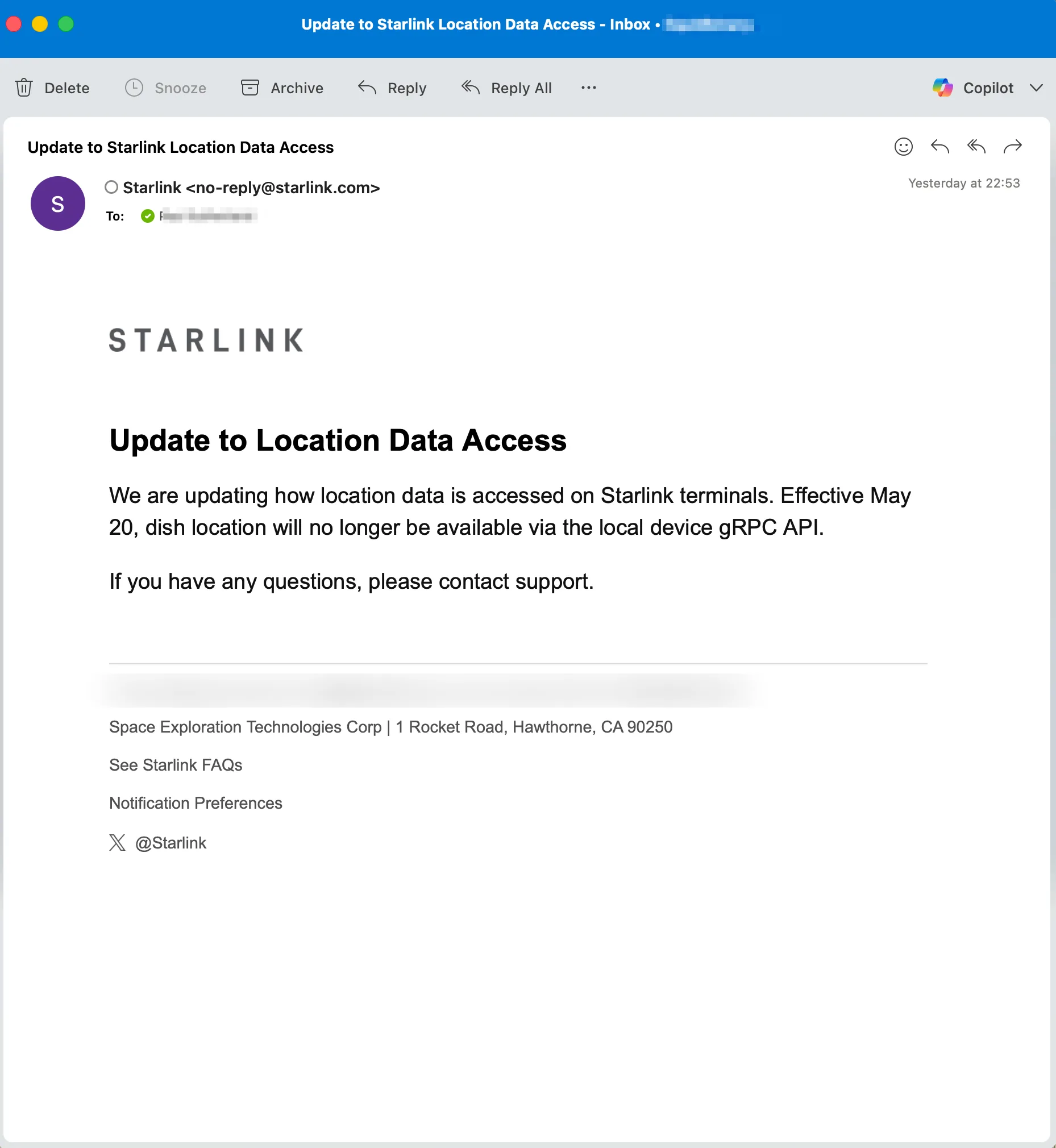
If you received an email from Starlink this week telling you that “dish location will no longer be available via the local device gRPC API” and you’re wondering what it means, this post is for you.
 If you’re a developer, integrator, or someone running Home Assistant on a mobile Starlink setup, this post is especially for you.
What’s changing
Every Starlink dish runs a gRPC service on your local network at 192.168.100.1:9200. This is how the Starlink app communicates with your dish over Wi-Fi. It’s also how third-party tools, including ours, pull telemetry data like signal quality, latency, obstruction maps, firmware versions, and GPS coordinates.
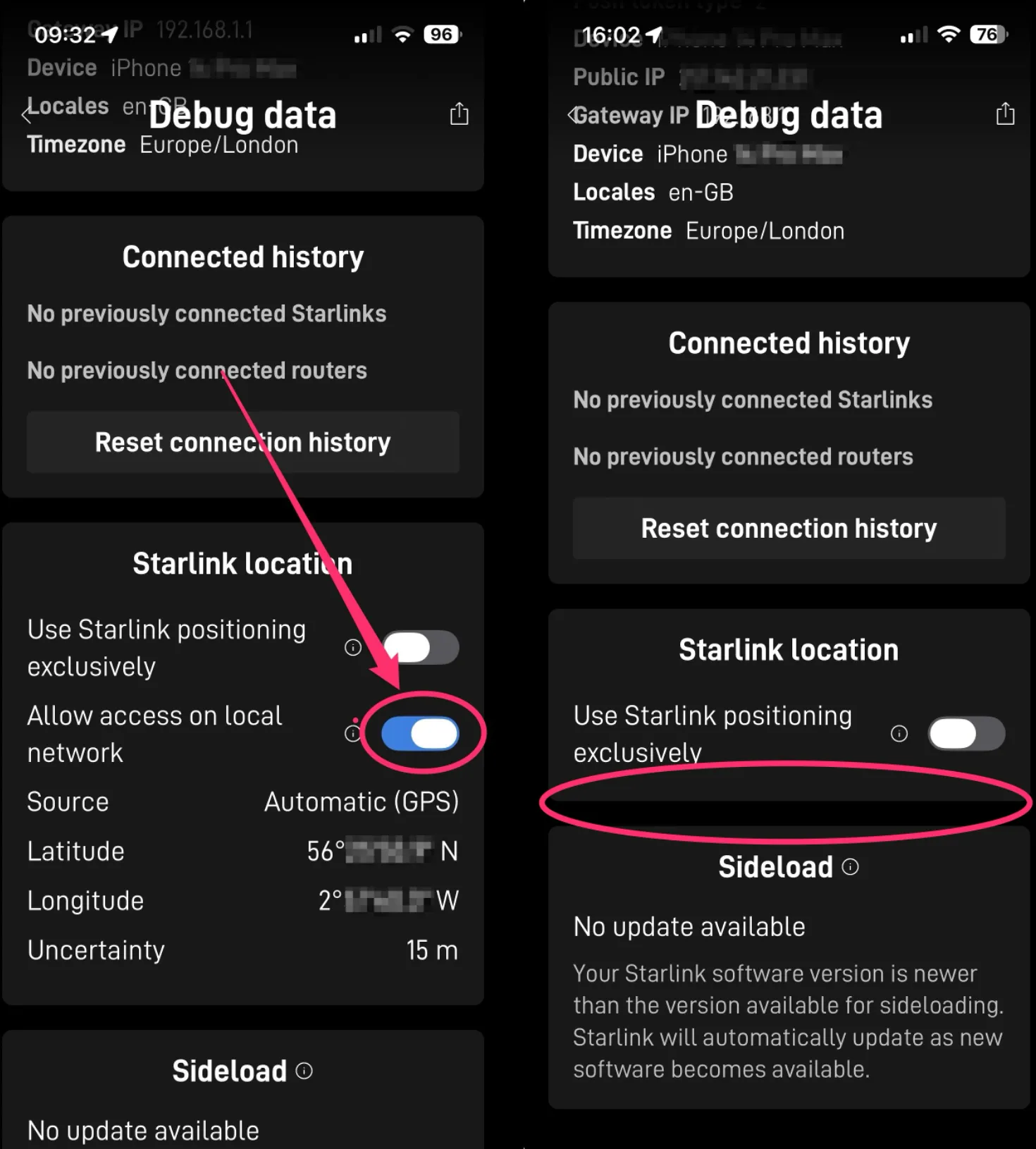
The GPS location was always a bit different from the other endpoints. It was disabled by default and required you to dig through the Starlink app to enable it: Menu, Info, Debug Data, then scroll down to find a toggle under “Starlink Location” to allow access on the local network. It was a faff to explain to users, involving several screen hops through the app, but once enabled it gave any device on your LAN the dish’s precise latitude, longitude, and altitude with no authentication required.
From 20 May 2026, that location data will no longer be available.
It’s already happening
The email says 20 May, but the change is already rolling out. On newer hardware like the V4 dish and the Starlink Mini, the toggle to enable location sharing has already been removed from the Starlink iOS app. The Debug Data section no longer shows the “Starlink Location” option at all.
Interestingly, the dish still reports gpsValid: true and a satellite count in its gRPC response. The GPS receiver inside the dish is still working, the dish still knows exactly where it is. What’s been removed is the ability for devices on your local network to ask for those coordinates. The dish knows. It’s just not telling you any more.
We confirmed this on our own hardware this week. The toggle is gone.
Why are they doing this?
Nobody outside SpaceX knows for certain, but there’s a reasonable security and privacy argument. The location endpoint had no authentication. If you’d enabled it, any device on your network, including guest devices, could silently read your precise GPS coordinates. That’s a privacy issue in itself: your exact home location, accessible to any device on your LAN without consent. Beyond that, any app with network access could bypass the operating system’s location permission prompts entirely by just querying the dish over HTTP instead of asking the OS for location services.
Android is particularly exposed here. Unlike iOS, which has a separate permission prompt for local network access, Android treats local and internet traffic the same. Any app with internet permission could have pulled your dish’s GPS without you ever being asked.
That said, the feature was disabled by default. You had to deliberately enable it through the Starlink app. Removing it entirely feels heavy-handed when the more measured fix would be to add an authentication step: let power users or third-party integrators securely request access to the location endpoint, rather than either broadcasting it openly or killing it completely.
There’s also the enterprise angle, which I’ll come back to.
Who is actually affected?
If you’ve never heard of gRPC and you’ve never enabled location sharing in the Starlink app, nothing changes for you. Your dish works exactly the same as before.
The people affected are those running third-party integrations that relied on automatically polling the dish for its location. That includes Home Assistant users with the Starlink integration, people using custom scripts for solar forecasting based on their location, Victron energy system owners who used the dish as a GPS source for their van or RV, and tools like Nexus Telemetry (which we develop) that use the coordinates for satellite tracking and route mapping.
For fixed-dish users, it’s a minor inconvenience. Your dish doesn’t move, so you can set your coordinates once in whatever system you’re using and forget about it. Home Assistant lets you set your home location under Settings. Most monitoring apps have a similar option. If you don’t know your lat/lon, right-click your address in Google Maps and it’ll show them.
For mobile users, RVs, vans, and boats, it’s more of a problem. The whole point of polling the dish was that the location updated automatically as you moved. You’ll now need an alternative source.
The enterprise API doesn’t help
Some people have suggested upgrading to an enterprise Starlink plan to retain access to location data via the Telemetry API. Having done enterprise Starlink development, I can tell you this isn’t the solution it appears to be.
The enterprise Telemetry API doesn’t give you the dish’s actual GPS coordinates. What you get back is an H3 cell ID. H3 is a hexagonal geospatial indexing system originally developed by Uber for mapping. It divides the planet into a grid of hexagonal cells at various resolutions. The API gives you the cell your dish sits in, and you can convert that to a lat/lon, but what you’re actually getting is the centre point of that hex, not where your dish physically is. Depending on the cell resolution it could be hundreds of metres off.
So even on an enterprise plan, you wouldn’t get anything close to what the local gRPC was giving you for free. And enterprise plans aren’t priced for individual RV owners.
What’s probably happening under the hood
My gut feeling is that the endpoint isn’t being ripped out of the dish firmware. It’s being moved behind authentication, the same way several other local endpoints are already gated. The Starlink mobile app has the keys to access these protected endpoints, which is how it still handles stow, unstow, and other restricted functions over your local network without needing an internet connection.
If that’s the case, the data is still there. It’s just locked down. Whether SpaceX eventually exposes an authenticated local API for third-party use is another question entirely, but the infrastructure for it exists.
What we’re doing about it in Nexus Telemetry
We’ve been building location source alternatives in parallel with this news. The first update, shipping before the 20 May cutoff, adds a manual location picker to both Home and Pro editions. Users can search for an address or postcode, click their location on a map, and the coordinates are saved. For fixed dishes this is honestly simpler than the old method of navigating through the Starlink app to find the debug toggle, and it’s better for privacy too. Your location stays in the app on your machine rather than being broadcast unencrypted across your local network for any device to read.
For mobile users, we’re adding support for USB GPS receivers that output standard NMEA data over serial. A dongle like the VK-162 costs about fifteen quid and gives you accurate, hardware-backed GPS on any platform. We’re testing across multiple chipsets and driver paths (u-blox M8, u-blox 7, GlobalSat with Prolific USB-serial) to make sure the integration works with whatever dongle users plug in. That update will follow shortly after.
Route mapping in session reports will continue to work. The GPS source will just be different.
The bigger picture
Of all the endpoints on the local gRPC API, location was always the one that surprised me most. I could understand why performance telemetry, signal quality, and obstruction data are exposed openly, third-party networking hardware like Peplink routers depend on it for WAN failover decisions. But broadcasting precise GPS coordinates with no authentication felt like it was always going to get locked down eventually.
What I’d push back on is removing it entirely rather than securing it. The gRPC service has to exist for the Starlink app and third-party routers to function. Adding authentication to the location endpoint specifically, while leaving the performance endpoints open, would have been the proportionate fix. It would have addressed the security concern without breaking the integrations that thousands of users have built around it.
Whether there’s enough pushback from the community to change SpaceX’s approach remains to be seen. Several users have already opened support tickets. If you rely on this functionality, it’s worth adding your voice.
In the meantime, the data is still flowing from every other endpoint on the local API. Nexus Telemetry will continue to monitor everything your dish broadcasts, latency, throughput, signal quality, obstruction maps, firmware versions, satellite connections, and subsystem health. The location was one data point among dozens. It’s the one we’re losing, but it’s far from the most important one.
What we built
Since this post, we’ve shipped full multi-source GPS support in Nexus Telemetry: five location sources with automatic fallback, so the app always knows where the dish is regardless of what SpaceX does with the local endpoint.
- Building Multi-Source GPS for Nexus Telemetry: what we built and how the fallback chain works
- Four GPS Receivers vs the Starlink Mini: a side-by-side comparison of four USB GPS receivers tested alongside the Starlink Mini’s built-in GPS
If you want to see what your dish is actually doing beyond what the Starlink app shows you, you can try it with a free trial at nexustelemetry.com.
Nexus Telemetry is built by Liquidbinary Ltd. Follow @nexustelemetry on X or subscribe to the newsletter for new posts.